


Meet the WooCommerce AI Agent: Your Store Operations Partner on DIMA-AI
Running a WooCommerce store means juggling orders, products, inventory, coupons, reviews, and customer questions. Most of that work lives inside the WordPress admin, spread across screens, exports, and spreadsheets. The **WooCommerce Shop Agent** on DIMA-AI brings that work into a conversation: ask in plain language, get live answers from your shop, and automate the tasks you repeat every week.
This connects securely to your real WooCommerce store through the Dima-AI Shop Agent WordPress plugin and works with your actual orders, products, customers, and carts.
Who is this for?
If you sell on WooCommerce and spend time on any of the following, this agent is built for you:
- Checking order status, payment mix, or revenue trends
- Updating product descriptions, SEO fields, or stock levels
- Creating coupons or moderating product reviews
- Exporting order or product data for reporting
- Watching for new orders, low stock, or new customer signups
Store owners, ecommerce managers, and small teams get the most value. You do not need to be a developer. You talk to the agent the same way you would brief a trusted shop assistant

What makes it different
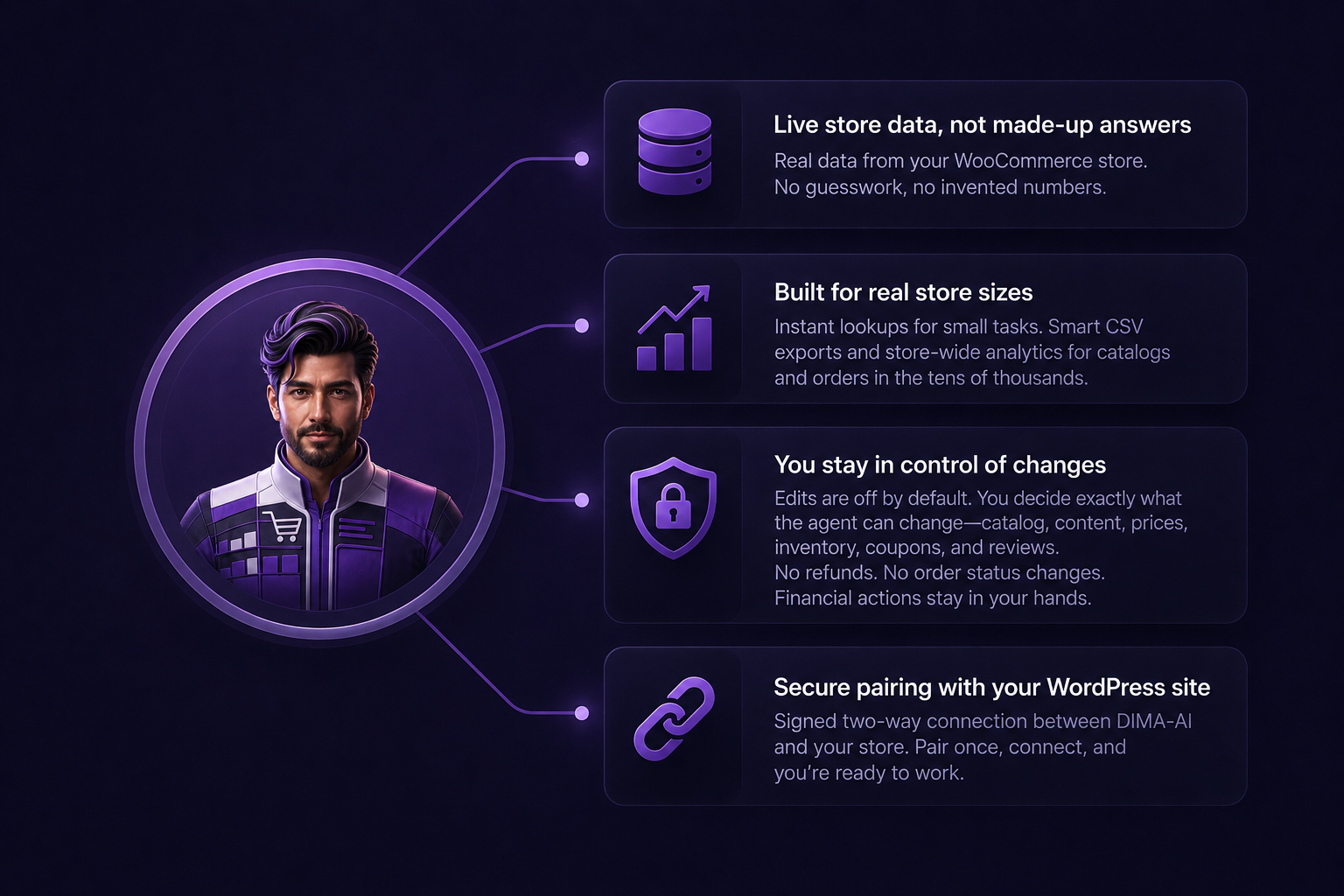
Live store data, not made-up answers:
The agent reads from your connected shop. Order counts, product names, coupon codes, and revenue figures come from WooCommerce itself. If something is not in the data, it says so instead of inventing numbers.
Built for real store sizes:
Small lookups are instant. Large catalogs and thousands of orders are handled properly: the agent exports to CSV and runs store-wide analytics instead of dumping endless rows into chat. That means questions like "analyze all orders from the last 90 days" stay accurate even when your order volume is in the tens of thousands.
You stay in control of changes
Reading your shop is always available. Edits are off by default. You choose exactly what the agent can change in WordPress under Settings → Dima-AI Shop Agent → Agent edit permissions:
- Catalog (categories, tags, attributes, variations)
- Product content and SEO
- Inventory and pricing
- Coupons
- Product reviews
The agent cannot process refunds or change order fulfillment status. Financial actions stay in your hands.
Secure pairing with your WordPress site
Setup uses a signed two-way connection between DIMA-AI and your store. Pair once, connect, and you are ready to work.
What can it do?
Here is a practical overview of what store owners use it for every day.
Orders and sales insight
- Find orders by ID, customer, date range, status, or product
- Pull full order details: line items, shipping, fees, coupons, notes
- Export all orders (or products, or customers) to CSV for your records
- Run store-wide pattern reports: status breakdown, payment methods, countries, average order value, top products
Example prompts:
- `@woocommerce Give me a sales overview and top 10 products for the last 30 days`
- `@woocommerce Export all orders from the last 90 days as a CSV`
- `@woocommerce Analyze all orders and tell me patterns by status, payment, and country`
Products and catalog
- Search products by name, SKU, category, or stock level
- Open a product from its storefront URL and summarize price, stock, and description
- Update titles, HTML descriptions, SEO fields, and images (when product content permission is enabled)
- Manage categories, tags, attributes, and variations (when catalog permission is enabled)
- Batch-update inventory or pricing across a category or selection
Example prompts:
- `@woocommerce Open https://yourshop.com/product/summer-jacket/ and summarize stock, price, and description`
- `@woocommerce Rewrite the HTML description and SEO title for product 120`
- `@woocommerce Mark all products in category summer-sale as out of stock`
Customers and carts
- Look up registered and guest purchasers with spend and order history
- Review active, converted, and abandoned cart snapshots
Useful for follow-up campaigns, support lookups, and understanding where checkout drops off.
Coupons and reviews
- Search, create, update, enable, disable, or remove coupons (when coupon permission is enabled)
- Search reviews, approve pending ones, reply, or moderate (when review permission is enabled)
- `@woocommerce Create a 15% coupon SUMMER15 expiring in 14 days for the Clothing category`
- `@woocommerce Approve pending 5-star reviews from the last week`
Works with other DIMA agents
Need a new product photo or marketing copy after a catalog update? The WooCommerce agent can download product images and hand them off to image or content agents in the same workflow. Your store data and creative work stay connected.
How much time does it save?
Exact savings depend on your store, but these are common before-and-after moments:
| Task | Manual approach | With the WooCommerce agent |
| Last 90 days of orders for accounting | Multiple admin exports, merging spreadsheets | One request, complete CSV artifact |
| What sold best last month? | Filter reports, pivot tables | One analytics question, instant breakdown |
| Update SEO on 20 products | Open each product in wp-admin | Batch instructions by category or ID |
| Low-stock check across catalog | Click through inventory screens | Ask for low-stock report or set a workflow trigger |
| Approve this week's reviews | Moderation queue one by one | One prompt with date and rating filters |
For many shops, tasks that used to take 30 to 60 minutes of admin clicking shrink to a few minutes of conversation. Workflow automation goes further: the agent can react to events without you being online.
Automation examples (workflows)
Beyond chat, the agent supports event-driven workflows. Your WordPress plugin sends signed signals when something happens in the store. DIMA matches them and runs the workflow you define.
Common triggers:
- New order created (optionally filtered by status, such as `processing` or a custom status)
- New product added
- New customer account created
- Product stock drops below a threshold (for example, below 5 units)
Example workflow ideas:
1. New order → notify team
When a new order is created with status `processing`, send a summary to Slack or email.
2. Low stock → restock alert
When any product stock drops below 5, message your purchasing channel with product name and SKU.
3. New review → moderation draft
When a review is submitted, pull details and draft a reply for human approval.
4. Weekly sales digest
Schedule a workflow every Monday: run analytics for the past 7 days and deliver a top-products report.
Triggered workflows fetch fresh data when they run, so payloads stay lightweight and results stay current.
Getting started on DIMA-AI
Setup takes about 5 minutes:
1. Install the WordPress plugin
Add and activate Dima-AI Shop Agent on your WooCommerce site (version 1.6.0 or newer for full export and analytics support).
2. Install the agent from the Marketplace
In your DIMA workspace, go to Tools → Marketplace, find WooCommerce Shop Agent, and install it.
3. Pair your store
Open the agent configuration panel. Copy the Callback URL and Pairing API key into WordPress under Settings → Dima-AI Shop Agent, save, then click Connect WooCommerce in DIMA.
4. Set edit permissions
In WordPress, enable only the write scopes you want. Start with read-only if you prefer to explore first.
5. Start chatting
Mention `@woocommerce` in any chat thread and ask your first question.
To verify the connection anytime: `@woocommerce What edit permissions are enabled on the connected shop?`
Try it today
Your WooCommerce store already holds the answers. The WooCommerce Shop Agent on DIMA-AI makes those answers easy to reach and the repetitive work easy to automate.
Ready to connect your shop?
1. Log in to your [DIMA-AI workspace]
2. Install WooCommerce Shop Agent from the Marketplace
3. Pair your store with the Dima-AI Shop Agent WordPress plugin
4. Ask your first question with `@woocommerce`
WooCommerce Shop Agent · E-commerce · by DIMA AI · Available free in the DIMA Marketplace
 DIMA
DIMA